Foundations 03 / Terms
How a photocopier differs from a printer an MFP and a copier in everyday office life
Four words cover the machines that put marks on office paper. Printer, copier, photocopier and MFP. People reach for them as if they name four rival products on one shelf. The words answer different questions. Two of them mean the same thing.
The four terms get used as if a buyer picks one over the others, the way someone picks a brand. Two of the four words name the identical machine. One of the four contains the other two inside it.
A printer starts with a file
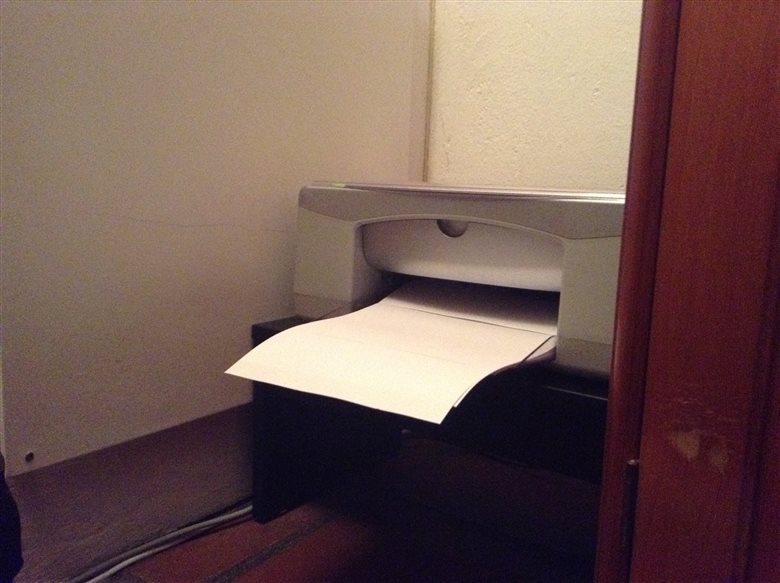
A printer turns digital data into marks on paper. The job begins as a file somewhere else, on a laptop, a phone or a server across the network. The printer receives that file and lays it onto a sheet. It never looks at a physical page. A plain printer has no glass, no scanner and no way to read a document a person holds out to it. Feed it data and it prints. Hand it a printed sheet and ask for a duplicate. The machine has nowhere to begin.
A printer cannot use a document file as it sits on the disk. A driver on the computer, or software inside the printer, translates the file into a page description, a precise map of where every dot belongs on the sheet. Languages built for this work, PostScript and PCL among them, carry that map to the print engine. The engine follows the map and lays the dots. A copier needs none of this machinery. It reads light off a page and writes the same pattern to the drum.
A copier starts with a page
A copier runs the opposite way. The job begins with a physical original, laid face down on a glass platen or pulled through a feeder. The machine reads that page with light and reproduces it on a blank sheet. Paper goes in. Paper comes out. No computer has to take part at any point in the cycle. A copier on its own is a paper-to-paper machine.
A copier hands its operator a set of controls. The original sits on the glass, so the machine can work on it as an image. It can enlarge a page or shrink one to fit a smaller sheet. It can darken a faint pencil note or lift a grey background off the page. It can place two pages onto one sheet, or fan a whole stack through the feeder and copy every page in a single pass.
It can print on both sides of the sheet, sort a long run into ordered sets or staple each set as it drops into the tray.
Photocopier is the same machine wearing a longer name. The photo part points to the light-and-static process inside, the xerographic method that reads a page by bouncing light off it onto a charged drum. In everyday speech the two words carry no difference at all.
The real split is where the job begins
A printer answers to data. A copier answers to paper.
A printer needs a computer, a phone or a network to hand it something to print. A copier needs a person to place an original on the glass. A printer can sit alone in a server cupboard, printing jobs sent from across the building with nobody beside it. A copier needs a body standing at the panel with a page in hand.
An MFP is both machines at once
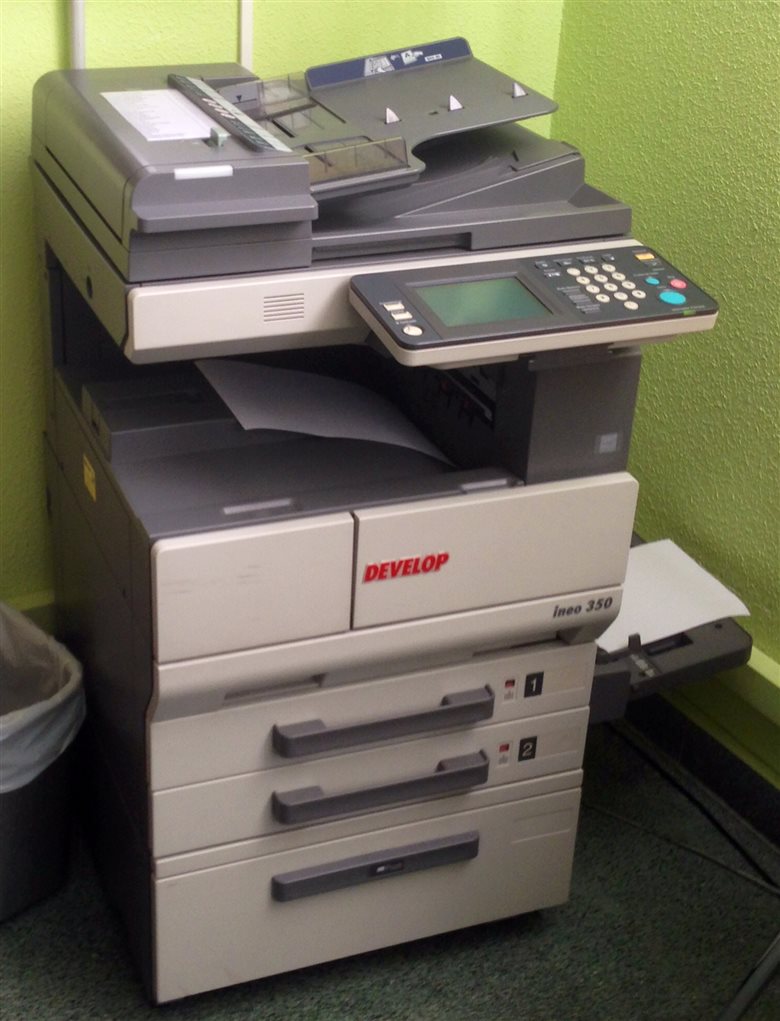
An MFP, short for multifunction printer, holds both machines inside one chassis. It carries the printer’s data path and the copier’s scanner glass together. Send it a file from a laptop and it prints. Lay a page on the glass and it copies. The same print engine does both jobs, since a copy is little more than a scan sent straight to the print side, with no file kept.
An MFP is a printer. The same MFP is a copier. It works as a scanner, often a fax machine on top of that. Both names describe one box from the side the speaker happens to use that day.
The scanner and the fax fill out the set
Two more functions ride inside a typical office MFP. A scanner takes paper and makes data. It reads a physical page the way a copier does, on the same glass and with the same light, then sends the result onward to a file. A copier sends that same read to the print engine. A scan ends as a PDF or an image on a computer. The front half of a copier and a standalone scanner do the identical job. The only difference is where the read-out goes, to a drum or to a disk.
It saves the page at a chosen resolution, measured in dots per inch, picked to suit plain text or a photograph. It can run the result through character recognition, turning a picture of a page into editable text. It can save one file or a whole stack, as a PDF or an image, ready to send or to store.
A scan can travel to more than one place. The machine sends it to an email address typed at the panel, to a shared folder on the network, to a cloud service or to a USB stick pushed into the front.
A fax takes paper and sends it down a phone line to come out as paper somewhere else. It reads a page like a copier. It turns that page into tones a telephone network can carry. A machine at the far end receives the tones and prints them.
All-in-one names the same thing
All-in-one is the retail label for an MFP. The two terms point at one kind of machine, one that prints, copies and scans from a single unit. Shops favour all-in-one on the carton, where it reads as generous to a home shopper. The trade and the IT department favour MFP or multifunction printer on the invoice and the support ticket.
The edge cases that test the words
A few machines sit on the boundary. A standalone document scanner reads paper into data, the way a copier’s front half does. It makes no print of its own. It serves as an input device. It is no copier. A label printer or a receipt printer takes data and prints it, so it passes the strict test for a printer, even where nobody would call it one out loud. A digital duplicator, the high-volume machine a school or a church runs off, copies a paper original the way a copier does, on a different internal process built for long runs.
Ask what the machine takes in, data or paper. Ask what it sends out, a print, a file or a copy.
Two newer machines stretch the words further. A 3D printer shares only the name. It builds objects from plastic and never marks a sheet, which places it well outside this family. A multifunction machine sold without a fax, common now that fax has faded, is still an MFP. The count of functions sets that term.
Why the office mixes the words
One machine now does the work of four older ones, so it answers to all four old names. A person sending a contract to print calls it the printer. The same person copying an ID card at the same machine an hour later calls it the copier. The IT ticket logs it as the MFP. The carton it arrived in said all-in-one.
The two questions the four words hide
Strip the four words back and only two questions sit underneath them. The first question is where a job starts. Does the work arrive as digital data, or as a sheet of paper to be reproduced? That question separates the printer, fed by data, from the copier, fed by paper. The second question is how many jobs the machine does. Does it do one thing, or several? That question separates a single-purpose printer from a multifunction unit that prints, copies, scans and faxes. The four office words are answers to these two separate questions, knotted together until they look like one choice. A printer is a data-fed machine, in nearly every case built for that one job. A copier is a paper-fed machine, able to stand alone in a copy room or to live as one function inside a larger unit. A photocopier is a copier under its full name. An MFP is the machine that answers both questions at once. It takes data and it takes paper. It does many jobs from the one chassis. The words clash only when someone treats them as four exclusive choices, as if a machine had to be a printer and so not a copier. In a current office the same box is almost always both at once. The single-purpose printer still has its place, at a desk or in a server room, where only data ever arrives. The standalone copier has nearly disappeared, folded into the MFP that handles its work beside everything else. A scanner takes paper and returns data, the exact reverse of a printer. A fax takes paper and returns paper at a distance, a copier stretched down a phone line.
The four words come from a history of separate machines that merged into one.
When to print and when to copy
The same document can reach paper two ways. The right one depends on where the document lives. A file on a computer goes faster to the printer. Printing it keeps every line sharp, since the machine builds the page from the original data. Copying a printout of that same file would add a generation of wear, a copy of a copy, a shade softer than the first. A page that exists only on paper, a signed form or a sheet torn from a book, has no file behind it. That page goes to the copier, the one route open to it.
Which word to reach for
For everyday office talk the loose use does no harm. The machine in the corner answers to printer, copier or MFP without anyone losing the thread of the sentence. The words tighten up at two moments that matter. The first is a purchase. A request for a printer can bring a data-only machine with no glass, one that cannot copy the stack of paper forms a front desk handles every day. Spelling out the need to print, to copy and to scan steers the order to the right box.
The second moment is a support call. Telling a technician that the copier function has failed, against the print function has failed, sends them to two different places inside the machine. One points at the scanner glass and the paper path for originals. The other points at the data connection and the print engine. The two halves fail in different ways. The print side jams on a driver, a network drop or an empty toner cartridge. The copy side fails at the glass, the scan head or the feeder that pulls originals through. A report of streaky copies points at a dirty scanner. A report of nothing on paper points at the data path. Outside these moments, the office can keep mixing the names at no cost at all.
What each machine asks of the office
The three machines make different demands on the people who keep them running. A printer needs a driver, a piece of software on every computer that sends work to it. Someone installs that driver, keeps it current and points it at the right machine on the network. A job can wait in a queue behind other jobs until the machine clears them. A copier asks for none of that. A person walks up, lays a page on the glass and presses a button, with no computer and no driver anywhere in the chain. An MFP carries both habits at once. Its print side wants drivers, a network address and a place in the queue. Its copy side wants only a hand and an original.
The words that turned into verbs
Two of these machines gave the language a verb. To photocopy a page means to copy it on that kind of machine. To xerox a document, in older speech, meant the same thing, taken from the brand that once held the whole market. Nobody says they printered a file or that they MFP’d a form. The verb fixed itself to the act of copying a physical page, the task that felt new when the machine first arrived in the office.
Common questions
Is a photocopier the same as a copier?
Yes. They name the same machine. Photocopier is the full term, pointing at the light-based xerographic process inside. Copier is the short form the office settled on. The two words carry no practical difference.
Is an MFP a printer or a copier?
It is both. An MFP prints from digital files and copies from paper originals on the same hardware. Multifunction printer is the full term for the machine.
What is the difference between a printer and a copier?
The source of the job. A printer turns a digital file into print and needs a computer to feed it. A copier reproduces a physical page laid on its glass and needs no computer at all. One starts with data, the other with paper.
Is all-in-one the same as an MFP?
Yes. All-in-one is the retail name, MFP the trade name, for a machine that prints, copies and scans from one unit. The term changes between the shop carton and the office invoice. The machine is the same kind.
Can a plain printer make copies?
No. A printer with no scanner has no way to read a paper original, so it cannot copy. A machine that both prints and copies has a scanner built in, which makes it an MFP. A plain printer cannot copy at all.
Four words, two of them identical in meaning, one of them holding the other two inside it. The office machine answers to printer, copier, photocopier and MFP because it grew out of all of them. Ask where a job starts and how many jobs the box does.